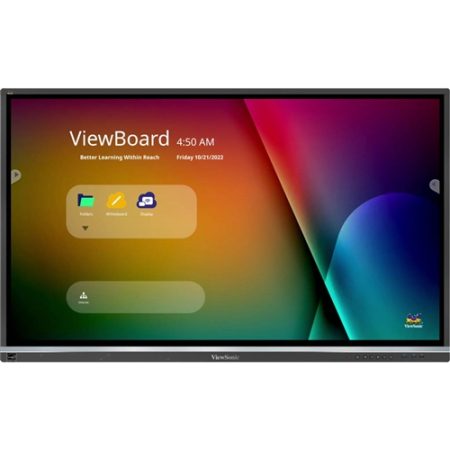
Key Features
- 40 Point Touch
- Android 11 OS Powered
- Screen Share Via USB -C
- Ultra Fine Touch
- Quick Content Sharing
What’s In The Box
- 65″ Interactive Screen
- Power Cord
- Remote Control With AAA Battery
- Touch USB Cable
- Touch Pen X 2 (VB-PEN-009)
- Quick Start Guide + Compliance statement
- RS232 adapter
- Clamp x 5
- Camera Plate
- Screw x 8
- HDMI cable
Document Downloads
ViewSonic IFP6550-5 65″ User Guide
ViewSonic IFP6550-5 65″ Quick Start Guide
ViewSonic IFP6550-5 65″ Technical Document
ViewSonic IFP6550-5 65″ Carbon Footprint Report
ViewSonic IFP6550-5 65″ Datasheet
Enquire About This Product
ViewSonic IFP7550-5 65″ 4K Interactive Screen
The Perfect Solution Designed Specifically For Modern Educators
Introducing the ViewBoard® 50-5 Series, designed specifically for modern educators. This innovative interactive display provides an intuitive interface, offering a seamless and engaging multi-user writing experience.
With its convenient single-cable USB-C connectivity, teachers can effortlessly connect and control their devices while delivering lessons. Featuring Ultra Fine Touch Technology with 40-point touch capability, both students and educators can enjoy smooth writing.
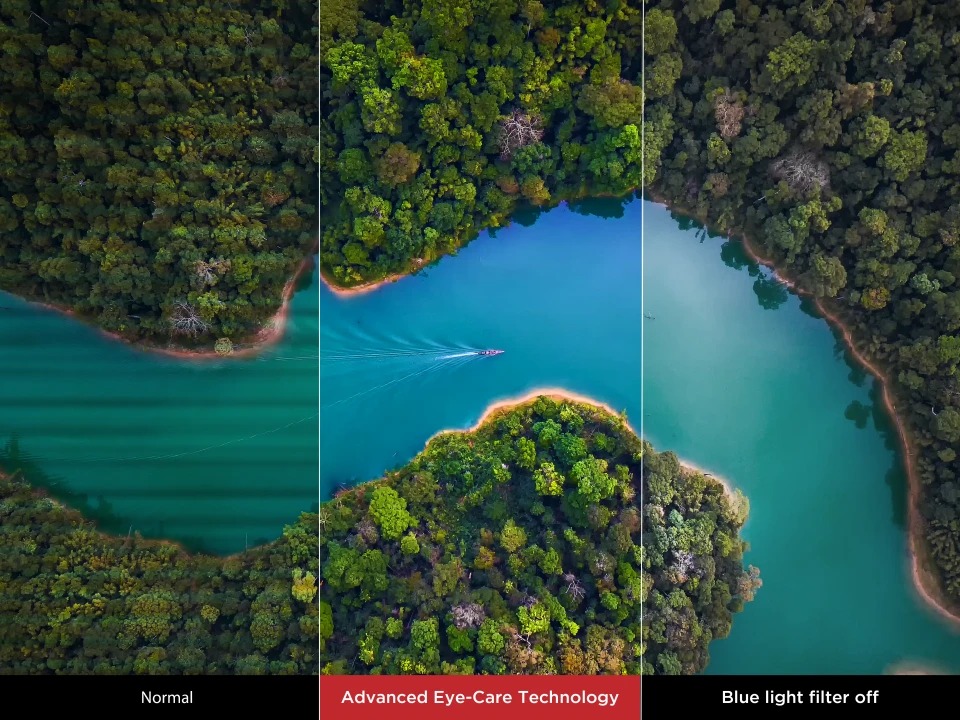
The series also includes a dual-pen with a wide selection of colors and sizes. Rest assured, the ViewBoard® 50-5 Series prioritizes eye care with Flicker-Free technology and an integrated TÜV certified blue light filter, ensuring optimal comfort at all brightness levels.
With complete integration into the myViewBoard suite, this series combines hardware and software to provide a comprehensive classroom solution. Furthermore, the ViewBoard® 50-5 Series is compatible with a diverse range of accessories, empowering educators to teach effectively with a variety of engaging tools.
Smooth Writing With Ultra Fine Touch Technology
Experience the unmatched smoothness and authenticity of writing with the dual-pen and Ultra Fine Touch Technology. With the ViewBoard® 50-5 Series’ multi-touch capability, multiple users can enjoy up to 40-point touch input, encouraging classroom engagement and fostering student collaboration.


One Cable Can Do It All
Introducing the ViewBoard® 50-5 Series, meticulously crafted for effortless usability. Equipped with a USB-C port among its wide-ranging connectivity options, this cutting-edge display enables seamless multimedia playback, swift data transfer, and hassle-free device charging—all through a single cable. Experience the freedom of a clutter-free workspace with our streamlined solution.
Teach Your Way With myViewBoard Whiteboard
Discover the ViewBoard, an exceptional educational tool that seamlessly integrates with the myViewBoard suite and works flawlessly across various platforms. With this versatile device, you can unlock the full potential of classroom time. Benefit from a wide range of customized features, including pop quizzes, an immersive reader, digital spinners, and timers, to effortlessly plan engaging lessons and activities, whether you’re teaching in-person or online. Additionally, students can utilize the ViewBoard’s unique capability to split into up to six mini whiteboards, enhancing their learning experience through hands-on participation.
Please note that the mini whiteboard feature in Participate Mode is exclusively available on WhiteBoard for Windows.


Quick Content Sharing For Multiple Attendees
Experience the power of ViewBoard Cast solution integrated into the ViewBoard Box, enabling seamless casting of up to four devices simultaneously. Unlock a world of sharing possibilities with its versatile split, extended, and grouped screen capabilities, empowering presenters to collaborate effortlessly across different devices.
Convenient Browser – Based Screen Sharing
Easily share your screen using myViewBoard Display, without the hassle of complicated setups. This convenient browser-based casting service enables instant sharing from compatible devices, eliminating the need for extra cables or pre-installed apps.


Efficient Remote Communication and Management
Enhance your campus communication effortlessly with myViewBoard Manager – a secure and user-friendly remote management system that allows you to update, schedule, broadcast, and manage multiple displays from anywhere. Simplify your messaging by sharing multimedia messages, text announcements, and even setting up emergency alarms. Unlock advanced features like task scheduling and multimedia broadcast with the optional Manager Advanced license.
Performance and Safety with the Latest OS
Experience exceptional performance with the octa-core CPU of the ViewBoard 50-5 Series, while ensuring the utmost security of your data through the use of Android 11 OS. This upgraded version also offers enhanced compatibility with a wide range of third-party apps, enabling you to seamlessly access all your preferred services in a familiar and user-friendly environment.


Immersive Audio for Captivating Lessons
Enhance student engagement and improve information retention with an immersive sound experience. Experience the power of the ViewBoard® 50-5 Series, equipped with two 12W speakers and a 16W subwoofer, delivering exceptional audio quality that amplifies music and videos like never before.
Easy on the Eyes
The ViewBoard® 50-5 Series utilizes cutting-edge technology to protect the eyes of users of all ages, without compromising on the superior visual experience. It combines Flicker-Free Technology, TÜV-certified low blue light, and an anti-glare coating to ensure safe and comfortable usage throughout the day.

Grow Green
This ViewSonic viewboard is dedicated to sustainability and constantly strive to integrate cutting-edge energy efficiencies and eco-friendly principles into the entire range of products. This ViewBoard 50-5 Series not only meets stringent energy consumption standards, but also prioritizes minimizing carbon emissions throughout the supply chain and ensures responsible end-of-life management. Additionally, it proudly carries the EPEAT bronze certification, solidifying its position as an outstanding environmentally conscious product.
Customise your Teaching
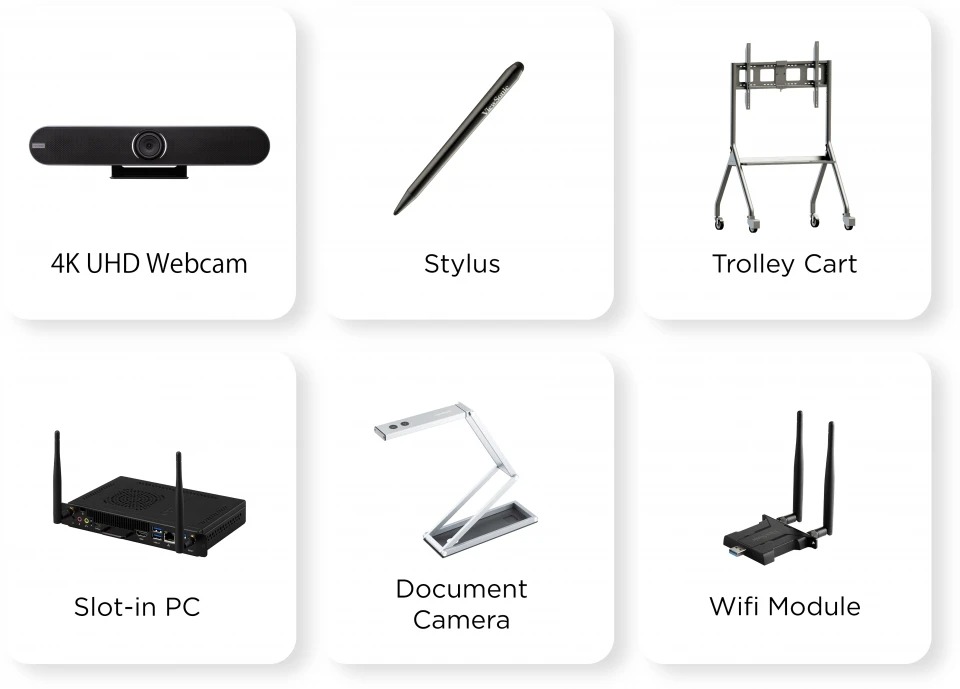
The ViewBoard 50-5 Series offers a comprehensive range of accessories, allowing you to personalize your device to suit your specific needs. Enhance your teaching experience with options such as a portable speakerphone, slot-in PC, motorized trolley cart, document camera, and various other add-ons, designed to cater to diverse teaching requirements and scenarios.
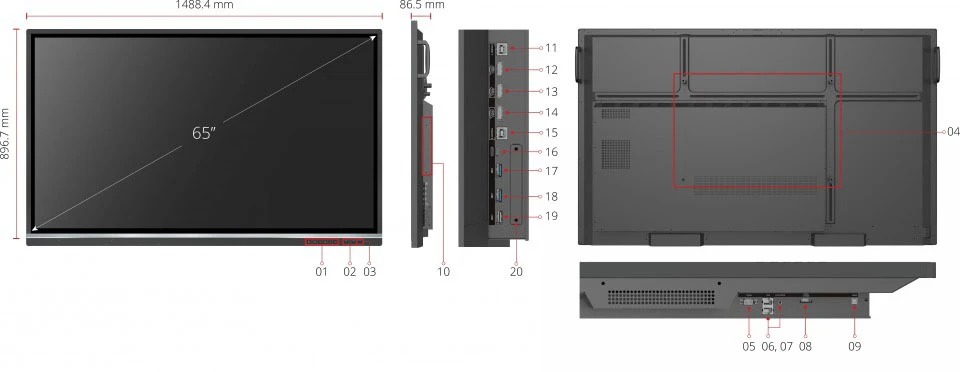
- Menu Control
- USB 3.0
- USB 2.0
- VESA® Wall Mount (800x400mm)
- RS-232
- LAN
- AUDIO OUT
8. HDMI OUT
9.SPDIF
10. OPS Slot
11. TOUCH 1
12. HDMI 1
13. HDMI 2
14. HDMI 3
15. TOUCH 2
16. USB TYPE -C
17. USB 3.0
18. USB 3.0
19. USB 2.0
20. Wi-Fi Module Slot


 Cables
 Cable Sleeves
 Content Cameras
 AV Cabinets
 AV Connectivity
 Multimedia Carts & Stands
 Shelf Brackets
 AV Equipment Shelves
 CPU Holders
 Holders
 Laptop Stands
 Monitor Mounts & Stands
 Monitor Mount Accessories
 Mounting Kits
 Projector Mounts
 Projector Mount Accessories
 Speaker Mounts
 Tablet Security Enclosures
 TV Mount Accessories
 BYOD All-In-One-Bars
 BYOD Cameras
 BYOD Conference Kits
 Collaboration Displays
 Interactive Displays
 Non-Interactive Displays
 Signage Displays
 Signage Display Mounts
 Signage Display Mount Accessories
 Huddle Space
 Small Room
 Medium Room
 Large Room
 Boardroom
 Teams Huddle Room
 Teams Small Room
 Teams Medium Room
 Teams Large Room
 Teams Scheduling Display
 Teams Accessories
 Acer Projectors
 Benq Projectors
 Epson Projectors
 NEC Projectors
 Optoma Projectors
 Panasonic Projectors
 Sony Projectors
 Viewsonic Projectors
 Vivitek Projectors
 Video phones
 Voice Gateways
 White IP Phones
 WiFi Handsets
 Airtame Wireless Presentation
 Barco Clickshare
 BenQ Instashow
 Poly Pano
 Conference Kits
 Headsets
 Webcams
 Zoom Huddle Room
 Zoom Small Room
 Zoom Medium Room
 Zoom Large Room