



In today’s era of remote work, mastering the art of optimizing remote meetings has become imperative for businesses and teams worldwide. Efficiently harnessing the potential of video conferencing, online collaboration, and virtual communication is the cornerstone of successful remote work. In this comprehensive guide, we’ll delve into a myriad of strategies and best practices that will help you achieve meeting excellence, ensuring productivity and engagement during virtual team meetings.
Before we dive into the nitty-gritty of remote meeting optimization, it’s essential to grasp the fundamental concepts. Remote work has ushered in a new era of virtual communication, where video calls and web conferencing are the primary modes of interaction. Remote teams rely on meeting software to foster collaboration, and that’s where optimizing remote meetings comes into play. Effective virtual meetings not only save time but also enhance team productivity and communication, making them indispensable in the modern work landscape.
To improve remote meeting efficiency, set clear objectives, share an agenda in advance, limit meeting duration, use technology effectively, encourage participation, and follow up with actionable tasks. Start by setting a clear meeting agenda and ensuring meeting preparation, as this lays the foundation for productive discussions. Moreover, mastering virtual presentation skills and virtual meeting etiquette are essential components in achieving success. Employing virtual meeting technology and remote meeting tools strategically can significantly impact the overall effectiveness of your remote meetings.
For remote teams, maximizing engagement with remote meetings is paramount. Implementing strategies like remote meeting facilitation tips and incorporating a remote meeting agenda template can lead to better productivity. In addition, choosing the right video conferencing tools for efficient virtual meetings is vital, as the wrong software can hamper communication. Moreover, enhancing virtual meeting technology for remote teams through systematic upgrades and comparisons of virtual meeting software can drive substantial improvements.
Maximising Remote Meeting Engagement with Remote Teams
In today’s dynamic work landscape, optimizing remote meetings is essential to foster effective communication and collaboration among remote teams. Remote work, driven by video conferencing and online collaboration tools, demands a keen understanding of the challenges that hinder meeting engagement. In this section, we explore the top 8 challenges faced by remote teams and provide actionable insights to enhance your virtual meeting experiences.
Technical Glitches and Video Conferencing Optimization
Technical issues like poor connectivity, audio problems, or software glitches are common challenges in remote meetings. To overcome this hurdle, invest in reliable meeting software and equip your team with the right technology. Video conferencing optimization is crucial for a seamless virtual meeting experience.
Lack of Engagement in Virtual Communication
Virtual communication can feel detached, leading to disengagement. To enhance online meetings, implement virtual meeting best practices.
Remote Collaboration Challenges
Collaborating effectively online can be challenging, especially when team members are spread across different locations. Employ remote collaboration tips to encourage active participation and idea sharing during virtual meetings.
Meeting Preparation and Agenda
Inadequate meeting preparation and a lack of clear meeting agendas can lead to unproductive discussions. Use a remote meeting agenda template to set clear objectives and expectations, ensuring meetings stay on track and focused.
Meeting Effectiveness and Facilitation
Remote meeting facilitation plays a vital role in keeping discussions productive and engaging. Team leaders should follow remote meeting facilitation tips to manage time efficiently and encourage participation from all team members.
Virtual Presentation Skills
Effective virtual presentation skills are essential, especially when presenting to remote teams or clients. Work on your virtual presentation skills to captivate your audience and convey information clearly.
Utilizing Meeting Software
Choosing the right meeting software is crucial for remote teams. Compare virtual meeting software options to find the best fit for your business needs, ensuring a smooth meeting experience for all participants.
Ensuring Remote Meeting Effectiveness
Cross-functional teams working remotely face unique challenges. Focus on remote meeting effectiveness by implementing strategies that cater to the specific needs of cross-functional groups.
Optimising Virtual Meetings for Client Presentations
Incorporating these tips and strategies will help you optimize virtual meetings for client presentations, ensuring they are informative, engaging, and valuable for both clients and remote teams.
Optimize Remote Meetings with a Clear Agenda
Start your virtual client presentation with a well-defined meeting agenda. Clearly outline the topics to be discussed, time allocations, and objectives. This helps participants understand the meeting’s purpose, keeping them engaged and focused. Use meeting agenda templates for better productivity.
Enhance Online Meetings with Effective Communication
Effective virtual meetings rely on excellent communication skills. Encourage participants to use video conferencing tools and practice good video call etiquette for efficient communication. Improve online meeting etiquette for remote work by minimizing interruptions and muting when not speaking.
Leverage Remote Meeting Technology
Utilize the latest meeting software and technology to enhance the client presentation experience. Compare virtual meeting software suitable for your business needs, considering factors like ease of use, features, and compatibility. This helps streamline virtual communication techniques.
Prepare for Virtual Presentations
Remote meeting preparation is key to success. Create a remote meeting agenda template that includes client-specific details. Develop a checklist to ensure everything is in place, from presentation materials to technical setup.
Maximize Remote Meeting Engagement with Remote Teams
To keep remote team members engaged during client presentations, use interactive features of meeting software. Incorporate polls, Q&A sessions, and breakout rooms to encourage active participation. Share visual aids and charts in real time to maintain interest.
Web Conferencing Best Practices for Remote Collaboration
Choose web conferencing solutions that facilitate collaboration seamlessly. Explore features like screen sharing, document collaboration, and virtual whiteboards. Encourage team members to use these tools effectively to enhance online meetings.
Remote Meeting Facilitation Tips for Team Leaders
Team leaders play a vital role in ensuring the success of virtual client presentations. Provide training on remote meeting facilitation techniques, such as time management, agenda adherence, and maintaining a positive atmosphere. Empower leaders to address client concerns promptly.
Remote Meeting Solutions for Small Businesses
Small businesses can benefit from cost-effective remote meeting solutions. Consider free or low-cost meeting software options that offer essential features. Evaluate their suitability for client presentations to make informed choices.
Improving Online Meeting Etiquette for Remote Work
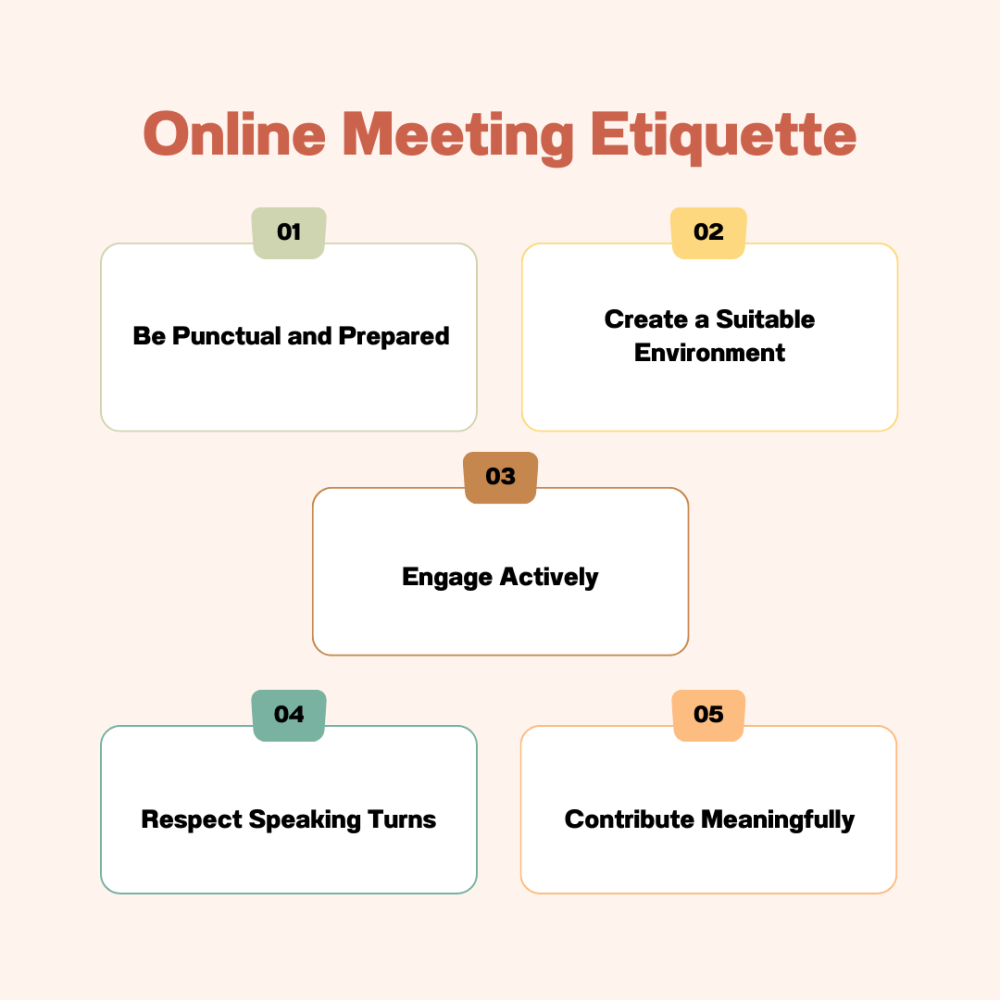
In the era of remote work, online meetings have become a cornerstone of virtual communication, facilitating collaboration among remote teams worldwide. However, to ensure the effectiveness of these virtual gatherings, it’s crucial to adhere to proper online meeting etiquette. In this section, we’ll explore eight essential etiquette guidelines for remote meeting participants, aiming to optimize remote meetings and enhance online collaboration.
Be Punctual and Prepared
- Arrive on time for virtual meetings, just as you would for in-person ones.
- Test your meeting software and equipment in advance to avoid technical glitches.
- Familiarize yourself with the meeting agenda and materials beforehand.
Create a Suitable Environment
- Choose a quiet and well-lit space for your video call to minimize distractions.
- Ensure your background is professional or use virtual backgrounds if necessary.
- Dress appropriately, as you would for an in-person meeting, to convey professionalism.
Engage Actively
- Mute your microphone when not speaking to reduce background noise.
- Use non-verbal cues like nodding and smiling to show your engagement.
- Avoid multitasking and stay focused on the meeting’s agenda.
Respect Speaking Turns
- Wait for your turn to speak and avoid interrupting others.
- Utilize meeting facilitation techniques to maintain order and ensure everyone’s voice is heard.
Contribute Meaningfully
- Prepare relevant insights and contributions to the discussion.
- Support your points with data or examples to enhance the meeting’s value.
Use Meeting Software Efficiently
- Familiarize yourself with the meeting software’s features to navigate smoothly.
- Share your screen when necessary, and use collaborative tools for effective presentations.
Follow Up and Provide Feedback
- After the meeting, send a summary or action items to participants.
- Offer constructive feedback to improve future meetings and communication.
Maintain Professionalism
- Avoid side conversations or distractions during the meeting.
- Practice good video call etiquette, such as muting when not speaking and refraining from eating.
Web Conferencing Best Practices for Remote Collaboration
In the era of remote work, optimizing remote meetings has become crucial for effective online collaboration, virtual communication, and team meetings. This section will explore various strategies and tools to enhance your remote meetings, ensuring that they are productive and efficient.
Remote Meeting Preparation
To kick off your journey towards optimizing remote meetings, thorough preparation is key. Here’s a checklist to get you started:
| Preparation Checklist | Description |
| Set clear objectives | Define the purpose and goals of the meeting. |
| Create a detailed meeting agenda | Outline topics, time allocations, and responsibilities. |
| Test meeting technology | Ensure that video conferencing tools work smoothly. |
| Share materials in advance | Distribute documents and presentations for review. |
| Assign a facilitator | Appoint someone to guide the meeting and keep it on track. |
By optimizing your remote meeting preparation using the above checklist, you’ll be on your way to conducting more productive virtual meetings.
Virtual Meeting Best Practices
To optimize remote meetings, consider these virtual meeting best practices:
- Engage Participants: Encourage active participation through questions and discussions. Use virtual meeting technology to facilitate polls, chat, and breakout rooms.
- Set Clear Expectations: Communicate meeting norms and expectations for punctuality, camera usage, and mute/unmute protocols.
- Video Call Efficiency: Ensure a stable internet connection and adequate lighting for clear video calls. Make sure everyone knows how to use video conferencing features effectively.
- Meeting Software Selection: Choose the right meeting software that suits your needs. Read remote meeting software reviews and consider factors like ease of use, security, and integration capabilities.
- Enhance Online Meetings: Utilize online collaboration tools for real-time document editing, screen sharing, and brainstorming. This enhances virtual communication and teamwork.
Remote Meeting Facilitation
Facilitating remote meetings can be challenging but crucial for success. Here are some tips:
- Stay on Agenda: Keep the meeting on track by following the prepared agenda and time allocations.
- Encourage Participation: Engage all participants and ensure everyone has a chance to speak. Encourage shy team members to share their thoughts.
- Summarize Key Points: After each agenda item, summarize key takeaways to maintain clarity and focus.
- Manage Disruptions: Address technical issues or interruptions promptly to minimize disruptions.
Virtual Meeting Effectiveness
Measuring the effectiveness of your remote meetings is essential for continuous improvement. Consider using virtual meeting software with analytics features to gather data on participant engagement, attendance, and feedback.
Conclusion
No two organizations are the same, and thus, customization plays a pivotal role in remote meeting success. Tailoring your approach to meet the unique requirements of your team or business can make a world of difference. Consider remote meeting solutions specifically designed for small businesses, explore telecommuting meeting strategies for remote employees, and adapt virtual presentation skills to your niche to ensure your remote meetings are optimized for your specific needs.
In the context of modern business, cross-functional teams are on the rise, requiring a specialized approach to remote meetings. To ensure virtual meeting effectiveness within such diverse teams, it’s essential to implement strategies that cater to their unique needs. Cross-functional teams often span various departments, locations, and time zones, making it imperative to employ advanced virtual communication techniques. In this scenario, remote meeting solutions that support seamless communication, collaboration, and information sharing become invaluable. Additionally, considering remote meeting productivity tips that specifically address the challenges faced by cross-functional teams can significantly enhance their efficiency, ultimately contributing to the organization’s overall success.
In conclusion, optimizing remote meetings is an evolving process that demands a deep understanding of remote work dynamics and a commitment to implementing the right strategies. By focusing on virtual meeting best practices, enhancing online meetings, and embracing the latest technology, you can unlock the full potential of remote collaboration, fostering team engagement and productivity. Whether you’re a team leader, business owner, or remote worker, mastering these techniques is key to remote meeting effectiveness and success.
FAQs
How can I improve the efficiency of remote meetings?
To improve remote meeting efficiency, set clear objectives, share an agenda in advance, limit meeting duration, use technology effectively, encourage participation, and follow up with actionable tasks.
What are the best tools for virtual team communication?
Popular tools for virtual team communication include Slack, Microsoft Teams, Zoom, and Google Meet. Choose tools that align with your team’s needs and preferences.
What should be included in a remote meeting agenda?
A remote meeting agenda should include the meeting’s purpose, a list of topics to be discussed, time allocated to each topic, and any pre-meeting materials or documents for review.
How can I make online meetings more engaging?
To make online meetings engaging, use visuals, interactive activities, encourage participation, vary meeting formats, and maintain a lively tone while respecting professionalism.
What are the etiquette guidelines for video conferencing?
Video conferencing etiquette includes dressing appropriately, muting when not speaking, maintaining eye contact, avoiding distractions, and being punctual.
What strategies enhance virtual meeting effectiveness?
Effective virtual meetings require good planning, active participation, concise communication, clear action items, and follow-up to ensure objectives are met.
How can team leaders facilitate remote meetings effectively?
Team leaders can facilitate remote meetings effectively by setting expectations, creating a safe environment, managing time, and ensuring everyone’s voice is heard.
What are the recommended video conferencing equipment?
Recommended video conferencing equipment includes a reliable computer, high-quality webcam, microphone, headphones, and a stable internet connection.
What is the importance of virtual presentation skills?
Virtual presentation skills are crucial for effective communication, engagement, and conveying information clearly in remote meetings and webinars.
How can I prepare for a successful remote meeting?
To prepare for a successful remote meeting, review the agenda, test your equipment, find a quiet space, eliminate distractions, and gather any necessary materials.
What are the best practices for web conferencing?
Best practices for web conferencing include having a backup plan for technical issues, sending reminders, using a consistent platform, and recording meetings for reference.
How do I enhance online meeting productivity?
To enhance online meeting productivity, set clear goals, stick to the agenda, keep discussions on track, and encourage participation while discouraging multitasking.
What are the key elements of effective virtual communication?
Effective virtual communication includes active listening, clear and concise messaging, adapting to different communication styles, and using appropriate channels.
What solutions are available for remote team collaboration?
Remote team collaboration solutions include project management tools like Trello, communication platforms like Slack, and document sharing services like Google Workspace.
How can small businesses optimize remote meetings?
Small businesses can optimize remote meetings by investing in technology, training employees, setting clear guidelines, and prioritizing communication and collaboration.


 Cables
 Cable Sleeves
 Content Cameras
 AV Cabinets
 AV Connectivity
 Multimedia Carts & Stands
 Shelf Brackets
 AV Equipment Shelves
 CPU Holders
 Holders
 Laptop Stands
 Monitor Mounts & Stands
 Monitor Mount Accessories
 Mounting Kits
 Projector Mounts
 Projector Mount Accessories
 Speaker Mounts
 Tablet Security Enclosures
 TV Mount Accessories
 BYOD All-In-One-Bars
 BYOD Cameras
 BYOD Conference Kits
 Collaboration Displays
 Interactive Displays
 Non-Interactive Displays
 Signage Displays
 Signage Display Mounts
 Signage Display Mount Accessories
 Huddle Space
 Small Room
 Medium Room
 Large Room
 Boardroom
 Teams Huddle Room
 Teams Small Room
 Teams Medium Room
 Teams Large Room
 Teams Scheduling Display
 Teams Accessories
 Acer Projectors
 Benq Projectors
 Epson Projectors
 NEC Projectors
 Optoma Projectors
 Panasonic Projectors
 Sony Projectors
 Viewsonic Projectors
 Vivitek Projectors
 Video phones
 Voice Gateways
 White IP Phones
 WiFi Handsets
 Airtame Wireless Presentation
 Barco Clickshare
 BenQ Instashow
 Poly Pano
 Conference Kits
 Headsets
 Webcams
 Zoom Huddle Room
 Zoom Small Room
 Zoom Medium Room
 Zoom Large Room